Preview, then Take
Click a clip or type its number and it cues paused at its In point, so the Take is instant. Auto-cue loads the next one as you go.
BetaPreview → Program
Cue it in Preview, take it to Program. Cueball plays a playlist of clips with dissolves, loops and links, out to displays, SDI and NDI at once, and takes its cues from the keyboard, a lighting console or the network.
Public beta · macOS on Apple silicon · Windows coming soon
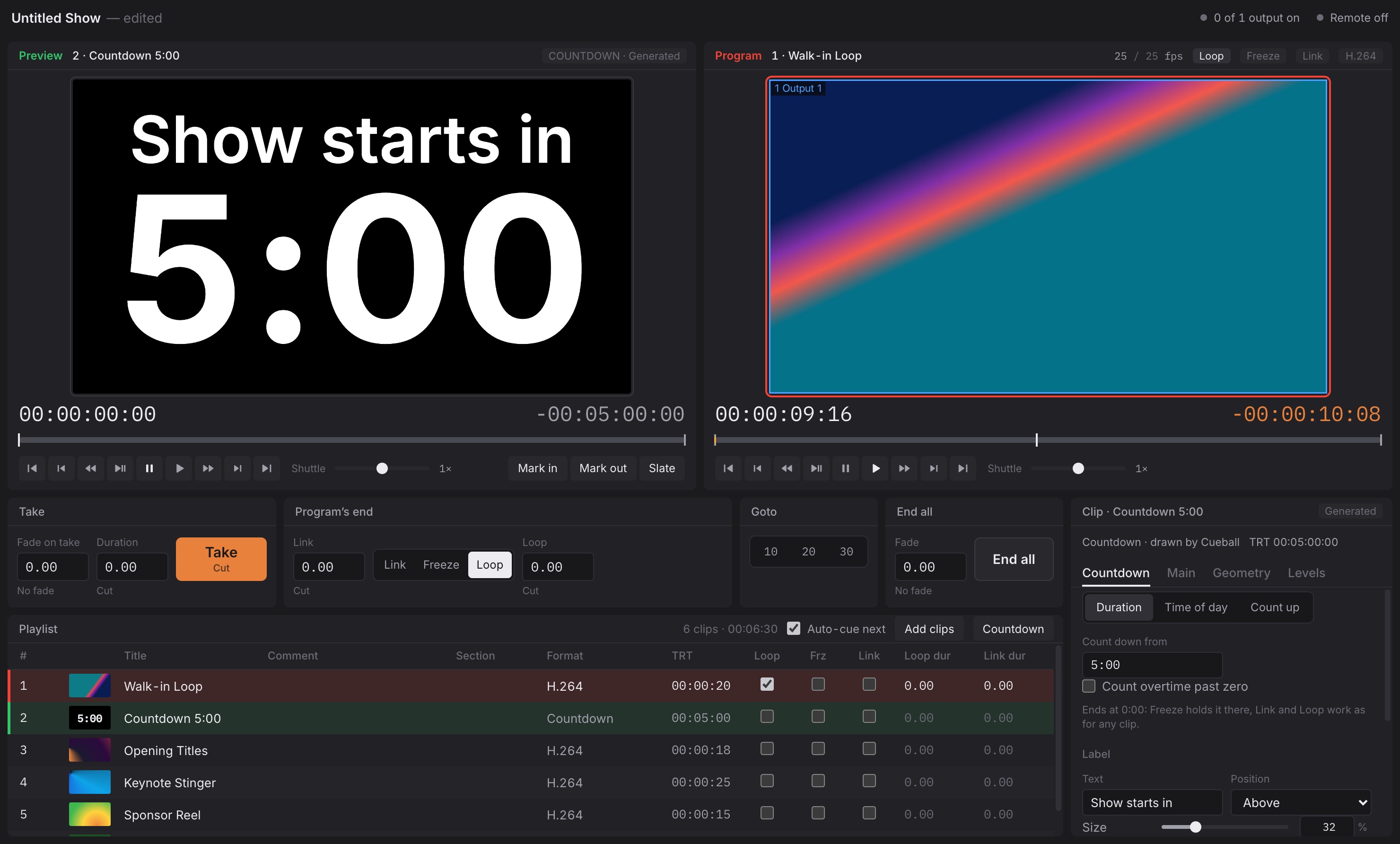
A switcher-style workflow that anyone who's run playback at a show already knows, with nothing in the way between the cue and the output.
Click a clip or type its number and it cues paused at its In point, so the Take is instant. Auto-cue loads the next one as you go.
One number for every transition: −2.00 dissolves for two seconds, 0.00 cuts, +2.00 holds black then cuts. Dissolves start before the Out point, so joins are seamless.
Each clip knows what to do at its end: play again, hold its last frame, or take the next clip. Link from the last clip goes round to the top, for walk-in and sponsor reels.
A clock Cueball draws itself, with no file to render: a duration, a time of day, or a stopwatch, with overtime in red. It's drawn on transparent, so it keys over anything.
In, Out and Slate points, fades, fit and crop, and black, gain, gamma, saturation and hue. Edit several clips at once, and see changes to the clip on air on the output.
A .cueball file holds the playlist, every setting and the output setup. Media paths are kept relative too, so a show folder moves between machines, and Locate relinks a whole folder at once.
Program is composed on a canvas of any size, such as an 8064×1536 LED wall or three HD screens side by side. Each output takes its slices of it, pixel for pixel or scaled.
Displays
Each display gets its slices, copied on the GPU from one composite, so a file is decoded once however many outputs show it. Every display shows the same frame.
SDI
Every format the card offers, from SD to UHD, including true interlaced motion. The card's clock paces it and follows genlock. Embedded audio is drift-locked. Key and fill come out on two connectors, frame-aligned.
NDI
Each NDI output is its own source, up to 2160p. With alpha on, the background is transparent where nothing is on air, so vMix or OBS can lay it straight over other sources.
SDI and NDI frames are composited by Cueball's own output engine, on Metal on a Mac and Direct3D 11 on Windows, straight into the card's frame memory. A busy or stalled operator window never touches the output, and cuts land on the frame the audio switches.
The operator, the lighting desk and a Stream Deck can all drive the same show.
DMX
Patch Cueball as one 9-channel fixture: clip, bank, control (cue, take, end all and so on), master intensity and volume, transition time, and Loop, Freeze and Link. Lock the app's own controls to put the console fully in charge.
| 1–2 | Clip and bank |
| 3 | Control: Cue · Take · End all · Play · Pause … |
| 4–5 | Master intensity, master volume |
| 6 | Transition: cut or mix 0.1–25.4 s |
| 7–9 | Loop · Freeze · Link |
Network
Simple GETs for Bitfocus Companion, Stream Deck or curl, and a WebSocket that pushes state as it changes.
// cue clip 12 and take it
GET http://host:7700/api/cueAndTake?number=12

// live state, pushed up to 10 times a second
ws://host:7700
→ {"cmd":"take"}
← {"event":"state","state":{…}}ProRes 422 and 4444, HAP, HAP Q and HAP Alpha, DXV, NotchLC, DNxHD and DNxHR, QuickTime Animation
H.264, HEVC, VP9 and AV1, in MOV, MP4, MKV, WebM, MXF and more, plus stills (PNG, JPEG) and audio files
ProRes 4444, HAP Alpha, QuickTime Animation, PNG and VP9 WebM, keyed over Program or sent as key and fill
macOS on Apple silicon. Hardware ProRes and H.264/HEVC decode. Blackmagic Desktop Video 14 or newer for DeckLink.
Windows 10 or 11, x64, with a Direct3D 11 GPU. AJA driver 15 or newer for Corvid and Kona cards, Desktop Video for DeckLink.
Wired gigabit or better for NDI (about 130 Mbit/s per 1080p59.94 stream). Art-Net, sACN unicast or multicast.

Signed and notarized for macOS, so it installs with no Gatekeeper prompts.
Cueball is still in beta: features are still landing, and things will change between versions. Try it with your own media, outputs and hardware before you take it to a show. Without a license key it’s fully working, with a “Cueball · Unlicensed” band across its outputs. Crashes and errors are reported to us automatically, with file and folder names left out, and Help → Report a Problem sends us anything else.